Working Notes are AI-assisted records developed from my project conversations, experiments, and feedback. I review them for accuracy, but they remain provisional and may evolve as I learn.
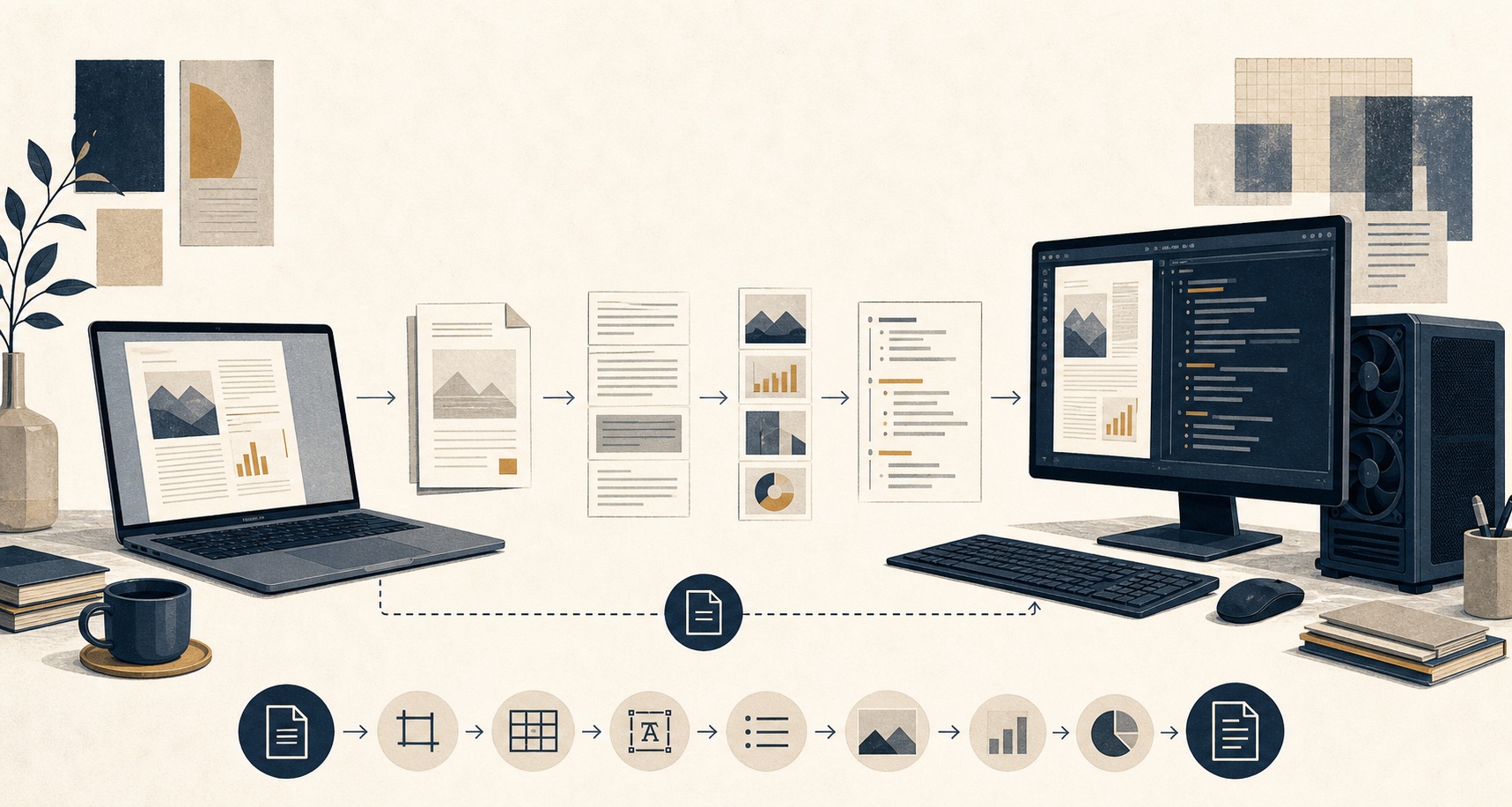
MarkForge is an open-source, local document-to-Markdown pipeline designed to run on a portable Apple Silicon MacBook Air as well as Windows systems with NVIDIA acceleration. It converts PDFs and Office documents into structured Markdown, extracted images, and manifests that record how the work was performed.
This Working Note focuses on the current design: the goals that shaped it, the role of each component, the tests that make its behaviour repeatable, and what happened when the pipeline was evaluated against a difficult public-domain book.
Design goals
I began with a fairly detailed operating concept rather than a list of Python modules. MarkForge should:
- keep source documents and model processing local;
- run on a portable MacBook Air while retaining Windows and NVIDIA support;
- inspect a PDF before committing expensive model resources;
- preserve reader-friendly chapters instead of exposing arbitrary processing chunks;
- keep extracted images connected through portable relative links;
- record page ranges, configuration, warnings, errors, and completion status;
- tolerate memory pressure by dividing difficult work and falling back to CPU;
- resume only when the source and processing configuration still match;
- apply the same conversion rules through the CLI and desktop interface; and
- produce traceable files for NotebookLM and future local agent workflows such as OpenClaw.
A completed process is not the same as accurate content. The manifest should record what ran and what failed without presenting file creation as proof that OCR, headings, captions, or footnotes are correct. That distinction requires both deterministic software tests and evaluation against representative documents.
AI agents helped map these requirements to an architecture, evaluate dependencies, implement changes, inspect real output, and turn observed failures into regression tests. They did not invent the operating concept or decide what counted as a useful result. Human intent defines the goals and acceptance criteria; agent-assisted development helps explore and implement possible solutions.
The current build approach is evaluation-led:
human operating concept
  -> explicit requirements and acceptance criteria
  -> component responsibilities and workflow design
  -> fast deterministic tests for known behaviour
  -> implementation
  -> representative document conversion and agent/human review
  -> newly discovered failures added to the regression suite
This ordering matters. The stack is selected to serve the workflow, and the implementation is judged against stated behaviour rather than against whether an agent produced plausible-looking code.
Why build this instead of buying a converter?
The ability to OCR a PDF or export it as Markdown is not unique. A purchased desktop application or cloud service can handle many one-off conversions with less setup. MarkForge is useful when the workflow itself matters: it can be inspected and changed, keeps documents local, separates reader-friendly chapters from machine-friendly work chunks, records provenance and partial failures, and produces ordinary files rather than locking the result inside one application.
That control has a cost. MarkForge requires dependency maintenance, model downloads, hardware testing, and manual evaluation of OCR quality. Commercial software may be the better choice when polished support and occasional conversion matter more than repeatability or customization. The design value here is not that no other converter exists; it is that this pipeline can be adapted, examined, tested, and improved around a specific way of working.
Architecture shaped by the goals
MarkForge targets Python 3.12 and uses uv for dependency locking, testing, and packaging. The CLI and CustomTkinter GUI call one shared ConversionEngine, so presentation can differ without changing conversion, recovery, manifest, or output rules.
That shared engine applies the core design policies:
- PDF structure is inspected before conversion.
- Logical output can follow chapters while physical work is still divided into smaller page ranges.
- Each document gets a manifest recording its source hash, settings, page coverage, status, warnings, and errors.
- Successful work can be resumed when the source and conversion fingerprint still match.
- Markdown and manifest files are replaced atomically, reducing the chance that an interrupted run leaves a half-written file that looks complete.
- Extracted images are stored under the document output with portable relative links from the Markdown.
- Failed accelerated chunks can be divided into smaller ranges, with the smallest failure retried on CPU.
The distinction between output chapters and processing chunks is important. A 60-page chapter should remain one useful chapter file for a reader or a retrieval system. Internally, MarkForge can process that chapter in smaller ranges to keep GPU or unified-memory use predictable, then assemble the result. The unit that makes sense to a person does not have to be the unit that makes sense to the machine.
For PDF structure, MarkForge looks first for bookmarks, then for visible headings, and finally falls back to fixed-page output groups. Internal processing uses smaller chunks independently of that output decision.
How tests make agent-assisted coding reliable
Tests are a central part of using coding agents responsibly. The human defines the intended behaviour and the evidence required to accept it; an agent can then propose or implement a change, run the suite, and receive an objective result. The tests act as executable project memory across prompts, sessions, and agents. They preserve requirements more reliably than expecting a future agent to reconstruct the same intent from conversation history.
The automated tests are intended to make the operating concept executable. Most of them use small PDFs created during the test and fake extractors that return predictable text and images. This keeps the suite fast, avoids downloading production models, and isolates MarkForge’s own decisions from the variable accuracy and performance of an OCR model.
The current suite contains 15 tests across several layers:
| Test layer | What is exercised | Why it helps |
|---|---|---|
| Structure and page coverage | Bookmarks, visible headings, front matter, fixed-page fallback, duplicate chapter names, portable filenames, and exact page coverage | A conversion should never silently omit, duplicate, or overwrite a page range merely because the source has weak structure. |
| Historical-scan regression | Split chapter headings, repeated running headers, damaged spellings such as CHAPTEE, and corrupted Roman numerals observed in Darwin | The failure is preserved as a repeatable case. Later changes cannot restore the same bug without making the test fail. |
| Engine and manifest | Segmented conversion, image paths, combined output, source page count, device and chunk settings, and a second resumable run | This verifies that the files and manifest agree, and that a matching completed run is skipped rather than unnecessarily processed again. |
| Recovery behaviour | A fake accelerator fails on a large range; the engine divides the work and retries two smaller ranges on CPU | Memory recovery is tested deliberately instead of waiting for an unpredictable real out-of-memory failure. |
| Output hygiene and cleanup | Empty image references, stray document-level HTML, unbalanced inline tags, and removal of MarkForge-owned temporary directories | Generated Markdown should surface suspicious output, while cleanup must never remove an unrelated directory. |
| Command-line contract | Default options, table-of-contents level validation, and a non-zero return code when a manifest contains failed segments | Scripts and automated workflows need a dependable failure signal; producing some files must not be reported as complete success. |
These tests improve the development process in two ways. First, they turn design decisions—such as complete page coverage, safe resume, and CPU fallback—into conditions that can be checked after every change. Second, they make troubleshooting cumulative. The Darwin chapter-detection failure did not end as a one-time patch; its OCR variants became synthetic regression cases that now run with the rest of the suite.
This is the deterministic handoff from agent-assisted diagnosis to software verification. An agent can inspect the 406-page book, compare proposed boundaries with the printed chapters, and reason that a change appears to solve the problem. Without a regression test, that expensive validation has to be repeated after the next change: run the document again, inspect the output again, and spend more model time deciding whether the result still looks correct. Once the observed failure is reduced to a small fixture and exact assertions, the test runner can verify the same requirement in seconds with the same expected answer every time.
The development pattern is:
representative document
  -> resource-intensive conversion and agent/human review
  -> specific failure isolated and understood
  -> small fixture plus an exact expected result
  -> fast regression check after every later change
The initial walkthrough is intentionally broad and expensive because it is still discovering what can go wrong. As the regression suite grows, routine validation becomes cheaper and more focused. Agent time can move toward new document types, layouts, and quality failures instead of repeatedly confirming behaviour that the test suite already knows how to measure.
The test therefore becomes reusable evidence of the specific fix. It does not depend on an agent remembering previous output or interpreting it consistently, and it avoids loading OCR models merely to check chapter-order logic, page coverage, filenames, or recovery policy. Agent review remains useful for discovering new failure modes; the regression suite prevents the team from paying the full discovery cost again for failures it already understands.
The boundary is important: a test proves the behaviour encoded in its fixture and assertions, not that every converted book is accurate. Mocked extractors can verify orchestration but cannot judge a previously unseen caption, equation, footnote, or historical typeface. Real public-domain books therefore provide a second evaluation layer: agent and human review discover new quality problems, then suitable deterministic failures are converted into regression tests wherever possible.
Portable execution on MacBook Air and Windows
Portability is a functional requirement rather than a packaging label. The same application should run locally on an Apple Silicon MacBook Air for mobile work and on Windows with NVIDIA acceleration when that hardware is available. It therefore needs to detect the compute device, control memory use, preserve recoverable progress, and behave consistently through either interface.
The Python dependencies are not interchangeable tools in a list. Each one owns a different responsibility, and each choice addresses a particular constraint:
| Component | What it does | Why this choice was made |
|---|---|---|
MarkForge ConversionEngine | Coordinates inspection, segmentation, extraction, retries, image paths, manifests, resume rules, and atomic output. | Keeping these policies in project code gives the CLI and GUI identical behaviour and makes failure handling testable without loading the production models. |
PyMuPDF (pymupdf) | Reads PDF metadata, bookmarks, page geometry, font information, and embedded text. It also creates temporary page-range PDFs and provides the native-text extractor. | Structural inspection and page slicing should be fast and deterministic. Running an OCR model merely to count pages, inspect bookmarks, or divide a PDF would be slow and unnecessary. |
Marker (marker-pdf) | Performs model-backed PDF interpretation: layout analysis, selective OCR, equations, tables, images, and Markdown rendering. | Plain text extraction loses too much structure on complex or scanned PDFs. Marker provides the higher-fidelity path while still keeping processing local. |
MarkItDown (markitdown) | Converts Word, PowerPoint, and Excel files into Markdown-oriented text. | Office files already contain structured document data and do not need the image-and-layout pipeline used for PDFs. A separate extractor avoids treating every format like a scanned page. |
PyTorch (torch) | Supplies the tensor runtime for the document models and exposes CUDA, Apple MPS, or CPU execution. | Marker already depends on PyTorch, and its common device interface allows MarkForge to select the hardware available on each machine and clear the appropriate cache during recovery. |
CustomTkinter (customtkinter) | Provides file selection, settings, progress, and cancellation in the desktop interface. | It provides an approachable Python-based desktop workflow on macOS and Windows while keeping conversion logic outside the interface. |
How the components work together
The application is a routed workflow rather than a chain in which every dependency runs for every document:
file or folder plus conversion options
  -> CLI or CustomTkinter GUI
  -> shared MarkForge ConversionEngine
       |
       |-- PDF
       |    -> PyMuPDF inspects structure and proposes page ranges
       |    -> ConversionEngine separates output chapters from work chunks
       |    -> Marker converts each required range
       |         -> PyTorch exposes CUDA, MPS, or CPU for local models
       |         -> Surya OCR 2 is invoked when the page needs visual recovery
       |              -> vLLM backend on NVIDIA
       |              -> llama-server backend on Apple Silicon or CPU
       |         -> Markdown, images, and extraction metadata return to the engine
       |
       |-- Word, PowerPoint, or Excel
       |    -> MarkItDown returns Markdown-oriented text
       |
       -> engine normalizes image paths and flags suspicious output
       -> segment Markdown and manifest are written atomically
       -> matching later runs can resume or skip completed segments
This division keeps inexpensive deterministic work ahead of model inference. PyMuPDF can count pages, read bookmarks, inspect visible headings, and create page ranges without loading Marker. MarkItDown handles Office formats without pretending they are page images. Marker and Surya are reserved for PDF interpretation, and the engine remains responsible for application policy, recovery, and evidence after extraction.
Using the desktop interface
The desktop interface exposes the same ConversionEngine used by the command line. The user selects a file or folder and an output location, then chooses the logical output split, compute device, processing chunk size, fallback page grouping, and whether to create a combined copy. The detected device is shown before processing begins; on this MacBook Air, MarkForge selected Apple MPS.

Preview structure is a preflight step rather than a conversion. It uses the inexpensive PDF inspection path to display the proposed chapters or page groups, filenames, page ranges, selected device, and encryption state before Marker loads its document models. This allows a user to catch a bad split strategy before committing time and memory to OCR.
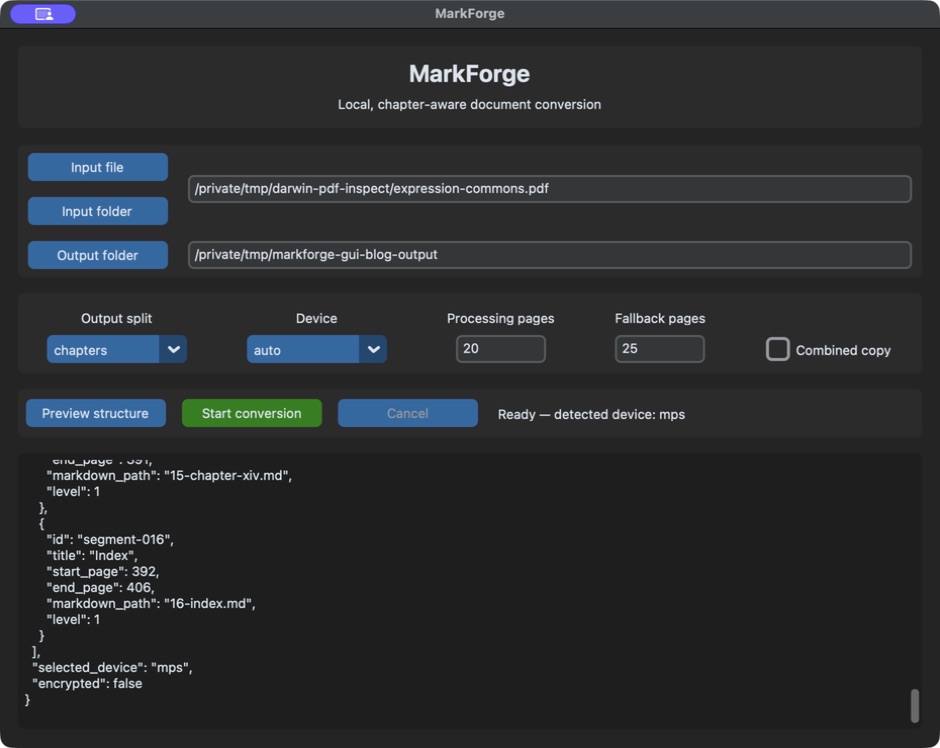
Start conversion passes those settings to the shared engine. The log then reports each segment and its page range, the completion state, and the manifest location. Cancel stops between processing chunks so completed work and evidence are preserved rather than discarded.
Documenting this walkthrough exposed a real application defect before the screenshots could be taken. The GUI had named its conversion-options helper _options, unintentionally overriding an internal Tk method with the same name. Tk called the MarkForge helper while creating the window and the application exited. Renaming it to _conversion_options fixed the collision; a regression test now protects that boundary, and Preview and Start also have keyboard shortcuts for repeatable operation. The full suite now contains 16 passing tests.
Two supporting dependencies sit outside that runtime division. uv provides one reproducible workflow for selecting Python 3.12, resolving and locking dependencies, running tests, and building the installable wheel. It was chosen to make the environment and packaging repeatable across development machines; it does not convert documents.
llama.cpp serves a different purpose. Marker 2 uses Surya OCR 2 to interpret a page visually when embedded PDF text is missing or unreliable. Surya is the AI vision-language model: it receives a page image and a task prompt, then predicts structured document content such as text, equations, tables, and layout. The model still needs software that can load its weights and perform the numerical inference. On CPU and Apple Silicon, that software is the llama-server HTTP process from llama.cpp; on an NVIDIA system, Marker uses vLLM instead.
Despite the similar names, llama.cpp is not Ollama, and this path does not mean MarkForge is running a Meta Llama chat model. Surya OCR 2 is the document vision model; llama.cpp is the local inference runtime; and llama-server is the process that exposes that runtime to Marker. MarkForge does not call the server directly. Marker and Surya manage the request and return the interpreted document blocks.
What happens when a PDF page is processed
Marker offers multiple processing modes. On CPU and Apple Silicon, it defaults to its fast mode: pdftext reads usable embedded text, a lightweight rf-detr model detects page layout, and Surya is invoked selectively when those less expensive stages are insufficient. This matters because not every page should pay the cost of vision-language inference.
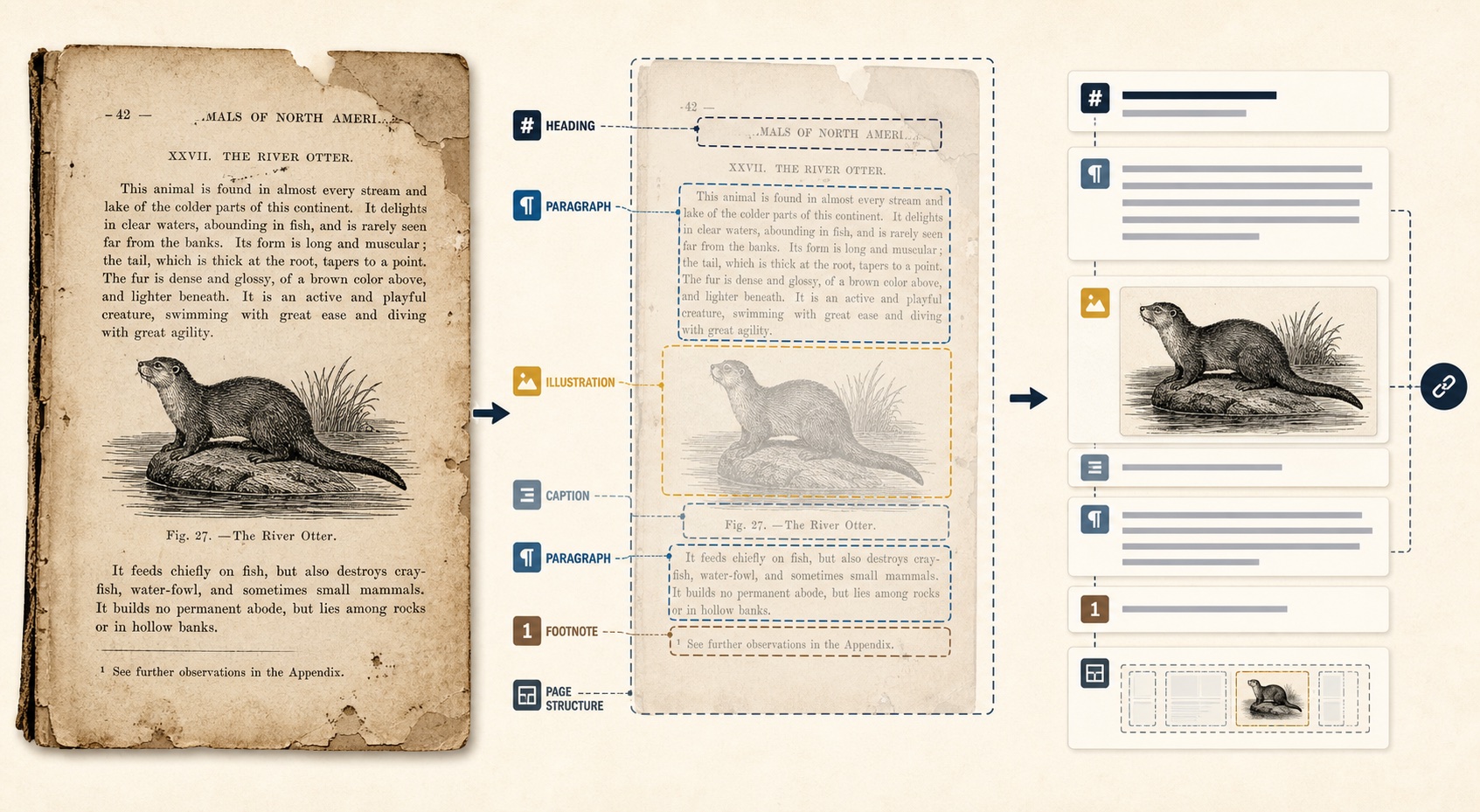
PDF input
  -> MarkForge uses PyMuPDF to inspect structure and choose page ranges
  -> Marker fast mode processes each requested range
       -> pdftext reads the embedded PDF text
       -> rf-detr detects page regions and layout
       -> quality checks select the recovery path
            -> clean text block: reuse the embedded text
            -> equation, empty block, or damaged text: send that region to Surya
            -> scanned or mostly unusable page: send the full page to Surya
            -> low-confidence table: use Surya as a fallback
       -> on Mac or CPU, llama-server runs the Surya model locally
       -> on NVIDIA, vLLM runs the Surya model locally
       -> Surya returns predicted text and document structure to Marker
       -> Marker combines the blocks, post-processes them, and renders Markdown and images
  -> MarkForge restores chapter-level output, normalizes image links,
     records warnings and provenance, and writes the Markdown and manifest atomically
This is a conditional document-inference pipeline, not an agentic workflow. The route can change according to page quality, but each component is following programmed rules and configured model calls. It is not forming a goal, planning work, choosing among open-ended tools, or judging whether the final book is useful.
It could, however, become one tool inside an agentic workflow. An OpenClaw agent could decide that a source document needs conversion, invoke MarkForge with suitable settings, inspect the resulting manifest and Markdown, and then choose whether to accept the result, retry it differently, or send a problem for review. The agency would belong to that outer decision loop; MarkForge would remain the controlled, testable document-processing tool it calls.
The agentic workflow in the project today is the surrounding development and evaluation process described earlier in this note: I define the operating concept and acceptance criteria; coding agents inspect representative documents, help diagnose failures, propose and implement changes, and run tools; then deterministic tests preserve the behaviours we have established.
There is one more similarly named feature worth separating. Marker supports an optional general-purpose LLM refinement stage through its --use_llm setting. The current MarkForge extractor does not enable that option and does not configure Ollama. Its model-backed PDF path is Marker plus Surya, with llama-server or vLLM supplying the local inference runtime.
On Apple Silicon, a clean digital page may use its embedded text without starting llama-server. Scanned pages, badly encoded text, equations, or low-confidence structures can trigger block-level repair or a full-page pass. llama.cpp is therefore not a general chat model, an OpenClaw component, or a cloud service; it is the local inference backend that allows Surya’s document model to run on the MacBook Air.
On the MacBook Air, PyTorch exposes the Apple GPU through MPS. Marker can use MPS for its main model inference, while MarkForge keeps logical chapters separate from the smaller page ranges used to control unified-memory pressure. If an accelerated range fails, the engine divides it and eventually retries the smallest failed range on CPU. CPU execution is slower, but it makes the pipeline usable without a supported accelerator and helps distinguish a document problem from a device-specific failure.
The llama-server requirement was easy to miss because a clean digital PDF may never exercise that recovery path. A conversion can progress normally until it reaches a scan or complicated layout that needs harder local inference. Installing llama.cpp is therefore part of the practical macOS runtime, while the documents and model work remain local and require no OCR API key.
This portability also creates a useful downstream path for AI tools. OpenClaw is a self-hosted gateway for AI agents, with file-based workspaces and support for local documents such as Markdown. MarkForge could prepare chapter-oriented Markdown, images, and provenance manifests that an OpenClaw agent can work with locally. That is an architectural fit to test, not a completed MarkForge–OpenClaw integration.
For the v0.2.1 prerelease, real Marker conversion has been verified on Apple MPS and CPU. Windows packaging is covered by continuous integration. A hardware-level NVIDIA CUDA smoke test remains an explicit verification item, so Windows support and current CUDA performance are not being treated as the same claim.
Packaging as a testable prerelease
Version 0.2.1 packages the project under the Python distribution name markforge-docs. It is currently installed from the GitHub release rather than PyPI. The Python import name remains markforge, and the installed commands remain markforge and markforge-gui.
uv tool install https://github.com/troyscott/markforge/releases/download/v0.2.1/markforge_docs-0.2.1-py3-none-any.whl
markforge --help
Calling it a prerelease is deliberate. Packaging makes the same build easier to install and test; it does not prove that OCR, chapter detection, images, tables, or citations are correct across real books.
Why the public test documents matter
Some useful test documents cannot be redistributed. They may support private evaluation, but they are unsuitable for a public, reproducible demonstration. A reader should be able to retrieve the same input, run the same inspection, and challenge the result without needing access to copyrighted source material.
I selected two Charles Darwin scans from Wikimedia Commons:
The Commons file pages label both works as public domain in the United States because they were published before 1931. They are useful tests for reasons beyond their copyright status: both are long documents with visible chapter headings, historical typography, front and back matter, and no embedded bookmarks. Expression also contains illustrations and captions that create a harder recovery problem than plain continuous text.
On 23 August 2026, I downloaded the exact Commons-hosted PDFs and inspected them with the same PyMuPDF calls used by MarkForge v0.2.1: len(document), non-empty page.get_text("text"), and document.get_toc(simple=True). The baseline is:
| Document | PDF pages | Pages with selectable text | Embedded bookmarks | SHA-256 |
|---|---|---|---|---|
| On the Origin of Species | 564 | 556 | 0 | 5260911d8f1583946d7641c6c6897587452ebcde94b82ca948a6b1a28dcaa5fd |
| The Expression of the Emotions in Man and Animals | 406 | 395 | 0 | 281c75514e72059ee1e1b399d6393b032d1a51154b560a14918ac429a8c543f2 |
The hashes matter. The Internet Archive source linked from the Origin Commons record currently serves a different PDF binary from the exact Commons-hosted file, and it produces a different selectable-text count. Page-level measurements are only reproducible when the artifact and inspection method are both identified.
These are inspection results, not conversion-quality results. They tell me how much embedded text exists and confirm that MarkForge cannot rely on bookmarks. They do not yet tell me whether headings will be detected correctly, OCR will preserve words, illustrations will be associated with useful captions, or chapter Markdown will be better for retrieval.
First walkthrough: Chapter V
The first controlled walkthrough used Chapter V of The Expression of the Emotions in Man and Animals, “Special Expressions of Animals.” It spans PDF pages 126–156 (printed pages 116–146). This is a useful 31-page slice because it combines continuous prose, running headers, footnotes, historical typography, five illustrations, and captions.
The walkthrough immediately found a structural failure in v0.2.1. When MarkForge inspected the complete 406-page PDF, it classified pages 1–391 as Front Matter and then proposed seven repeated INDEX. segments. Isolating Chapter V did not fix automatic structure detection: despite the visible CHAPTER V heading, inspection fell back to 25-page groups. The chapter could still be converted by explicitly selecting single-file output, but the heading detector did not recognize this typography reliably.
I then ran two CPU conversions against the same chapter extract:
| Extractor | Status | Characters | Images | What it showed |
|---|---|---|---|---|
| Native embedded text | Success | 50,185 | 0 | Fast baseline, but with fragmented lines, OCR errors already embedded in the PDF, and no illustration recovery. |
| Marker | Success | 50,522 | 5 | Recovered all five visible illustrations with relative Markdown links and nearby captions. OCR and cleanup remain imperfect. |
The Marker manifest reported no warnings, but manual review still found defects: CHAPTER became CHAPTEE, individual words and footnotes contain recognition errors, and the final page includes malformed HTML fragments. This is an important evaluation result. A successful process status means the files were produced; it does not mean the content is publication-ready.
Turning the failure into a regression
This was not just a different page layout. The scan has no bookmarks, and its selectable text is itself an OCR product. Large printed headings appear in the text layer as variants such as CHAPTEE, CHAPTEB, GHAPTEE, and CHAPTEK. Roman numerals can be damaged too: Chapter III appears as HI, Chapter VIII as VIIL, Chapter XI as XL, and Chapter XIV as XIY. Small running headers repeat on ordinary pages, including INDEX. near the back of the book.
The first repair recognized Roman numerals, joined a chapter word to a numeral stored on the next line, tolerated one common OCR spelling, and rejected small running headers using relative type size. It improved the result but still merged Chapters VII, VIII, XI, and XIII into neighbouring chapters. That incomplete result was useful: it showed that a single spelling exception was not a general fix.
I added synthetic regression pages reproducing the observed OCR variants before broadening the implementation. The revised detector now:
- accepts a narrowly bounded amount of OCR damage in the word
Chapter; - recognizes intact Arabic and Roman chapter numbers;
- uses the previous valid chapter as context to repair an invalid or implausible OCR numeral when it closely resembles the next expected Roman numeral;
- preserves valid modest jumps, because a real source may omit a chapter; and
- requires heading prominence, which separates the large
INDEX.title from its smaller running headers.
The full 406-page inspection then produced 16 non-overlapping segments: front matter, Chapters I through XIV, and the index. The detected chapter starts were PDF pages 37, 60, 76, 93, 126, 157, 190, 212, 238, 255, 272, 300, 334, and 372; the index begins on page 392. Every PDF page is covered exactly once. All 15 automated tests pass, including the new historical-scan cases.
The malformed HTML exposed a second observability gap. MarkForge now removes stray document-level <html> and <body> tags emitted inside Markdown and records warnings when <sup> or paragraph tags remain unbalanced. Applied to the Chapter V result, it removed two document-level tags and surfaced both remaining imbalances. It deliberately does not guess how to repair the footnote content; that still requires review.
The downloadable sample below is intentionally small and uncorrected. It contains the opening excerpt around Figure 14, the extracted “Head of a snarling Dog,” and a short README identifying the settings and known defects. It is evidence of the current output, not a corrected edition of Darwin.
MarkForge example Download the raw Chapter V excerptUncorrected Markdown plus one extracted illustration from the public-domain Darwin scan.ZIP · MarkForge v0.2.1 · Marker on CPU · source PDF pages 126–129The planned NotebookLM test
The next workflow is intentionally simple:
public-domain PDF
  -> MarkForge inspection
  -> chapter-oriented Markdown plus images and manifest
  -> Google NotebookLM
  -> structured retrieval and citation checks
For each Darwin book, I plan to compare the original PDF with the MarkForge chapter Markdown as NotebookLM sources. The questions are not just whether NotebookLM can produce a plausible summary. I want to test:
- whether chapter summaries preserve the main claims and qualifications;
- whether claims can be compared accurately across separated chapters;
- whether answers cite the right source passages;
- whether retrieval is more reliable from chapter Markdown than from the original historical PDF;
- whether illustrations and captions remain discoverable and connected to the surrounding discussion; and
- whether failures can be traced back through the Markdown, images, and manifest to a specific page range.
The comparison needs representative questions with expected evidence before I run it. Otherwise it would be too easy to accept fluent answers as proof that the conversion worked.
Known limits and next measurements
MarkForge cannot reconstruct information that its extractors fail to recognize. Historical type, damaged scans, marginal text, complex tables, equations, multi-column layouts, illustrations, and detached captions can all produce imperfect Markdown. Image extraction can preserve a visual without recovering its meaning or its correct place in the argument. CPU fallback can rescue a failed operation without guaranteeing better content.
Before drawing conclusions, I still need to record:
- detected chapter boundaries in the second Darwin book compared with its printed table of contents;
- missing, duplicated, and out-of-order pages across all output files;
- OCR error samples from clean, difficult, and illustration-heavy pages;
- heading, paragraph, footnote, caption, table, and image recovery;
- processing time, peak memory, retries, and fallback behaviour on Apple Silicon;
- resume behaviour after a deliberately interrupted conversion;
- differences between the original PDF and Markdown in NotebookLM retrieval and citations; and
- the same hardware-level smoke test on a real NVIDIA system before making a current CUDA-performance claim.